Form Language
How to set a workflow's default language, how translations reach respondents, and how forms handle right-to-left languages and numbers.
What the form language setting does
A FormAssembly workflow is written in one default language and can offer more through translations. Each response runs in one language, the run language, and every step of that response renders in it: forms, confirmation messages, emails, approval and signing screens, the intake agent and workflow-level messages such as the availability message. There are no per-step language settings.
To build the form itself, see Designing Forms.
How do I set the workflow's default language?
The default language is the language the workflow's content is written in. FormAssembly uses it as the fallback for any text a translation leaves out, and as the language a response starts in when the respondent's browser does not match anything the workflow offers.
- Open the workflow in the builder.
- Click Properties in the builder header.
- Choose Languages.
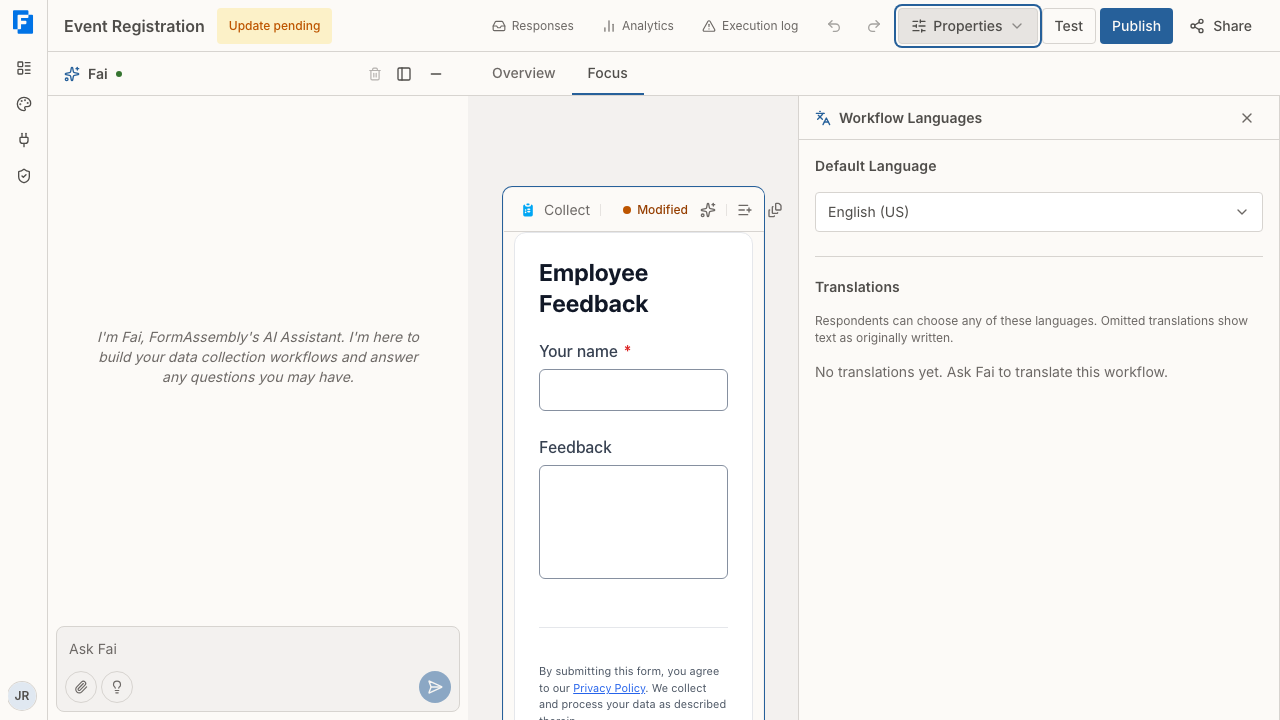
- Click the Default Language setting and pick a language.
Changing the Default Language setting changes which language FormAssembly treats as the original. It does not rewrite your form text into that language.
Translations
A translation is the workflow's respondent-facing text in one additional language. The Translations list in the same panel shows each translation language with how much text it leaves out: either "Nothing omitted" or "N omitted".
The panel is a read-only list. It does not add, remove or edit translations. To add or edit a translation, ask Fai (see Using Fai).
Be precise about what you ask for, because two requests sound similar and do different things:
- "Set this workflow's language to French." rewrites the content in French and makes French the default language.
- To offer French alongside the original, ask Fai to translate the workflow into French.
If a request could mean either, Fai asks which one you mean before editing.
When Fai generates a language you already have, it replaces that language's translation. Fai flags rich text and HTML for your review, because formatting can shift during translation.
What a translation covers
A translation covers the respondent-facing text the workflow owns:
- Form text: the form title, the submit button label, page and section text, field labels and help text, HTML blocks, image alt text and video titles.
- Choice labels and picture-choice option descriptions.
- Step text: email subject and message, the confirmation message on a Respond step, approval and signing screen text, connector error messages, and assignment invitation and cancellation messages.
- Workflow-level text: the public workflow name, the availability message, and the intake agent's nickname and welcome message.
A translation never contains structure, field IDs, validation rules, conditions or stored values. Image, video and transcript links are not translated. Field references such as {{ step_1.fieldId }} stay unchanged in a translation and resolve to the collected value.
A sub-workflow carries its own translations and never reads its parent's. A sub-workflow's name in the builder is a label for you, not respondent text, so it is not translated.
A document generation template is an uploaded file and is not translated. Generated documents use the default template, with merged values formatted for the run language.
Omitted text
Any text a translation omits, in a form, an email or any other step, shows in the default language, which is often what you want. A translation that is blank or contains only spaces counts as omitted and renders in the default language, so a respondent never sees empty text. Omitted text never blocks publishing.
This makes partial translations a deliberate choice. If an internal email to staff should always arrive in English, leave it out of the translation.
How does FormAssembly choose a respondent's language?
When a response starts, FormAssembly compares the languages the respondent's browser asks for against the languages the workflow offers. It takes the first browser preference that matches, comparing the full language tag first and then the base language, so a Canadian French browser matches a French translation. With no match, the response starts in the default language.
FormAssembly's own text in a variant it has no strings for, such as Canadian French, uses the base language's strings, then English (US).
FormAssembly reads the browser's language only when a response starts. A resumed response, a replayed response, a replacement, or a later step opened from a link uses the language already recorded on that response. There is no language parameter you can add to a form URL.
A sub-workflow run does not inherit the parent's language. FormAssembly chooses it when the assignee first opens their step, matching their browser against the languages the sub-workflow offers. An assignment step's invitation and cancellation messages belong to the parent run and render in the parent run's language.
Can respondents switch language on the form?
Yes. When a workflow offers more than one language, FormAssembly shows a language switcher on the form. Each language is named in its own language, so a French option reads "Français".
Choosing a language reloads the current step in that language and keeps the answers already entered. FormAssembly validates nothing, advances nothing and records no submission when the respondent switches. The respondent must activate a choice explicitly, so moving through the list with a keyboard does not change the language by itself.
From that point on the chosen language is the run language, and every later step of the response renders in it.
What FormAssembly translates automatically
Beyond your own text, FormAssembly translates the strings it owns on the form into the run language. These include the Submit, Previous and Next buttons, the Add another and Remove controls on repeated content, the page progress label, the default thank-you message, the "This form is currently unavailable." message, and every validation error message.
Where you have set your own label or message, yours is used and the automatic translation is the fallback. That applies to the submit button label, page navigation button labels, per-field validation messages and the confirmation message on a Respond step.
Offering a language with no translated text is valid. The workflow is offered in that language, your content stays in the default language, and FormAssembly's own strings, number formats and text direction follow the chosen language.
Supported languages
FormAssembly supports these languages for the default language and for translations: English (US), English (UK), French, Spanish, German, Portuguese (Brazil), Portuguese, Italian, Dutch, Japanese, Chinese (Simplified), Chinese (Traditional), Korean, Arabic and Hebrew.
Publishing refuses a translation in a language outside this list, and refuses a translation listed in the workflow's own default language.
Right-to-left layout
FormAssembly infers text direction from the run language, so Arabic and Hebrew render the form right to left with no setting to turn on. Text alignment, input padding and icon placement, progress bar fill direction and the action bar order all follow: Previous sits on the right, Next and Submit on the left.
A workflow whose default language is Persian or Urdu also renders right to left, with FormAssembly's own text in English.
The builder's own menus and panels stay left to right. Only the form itself flips.
How numbers are entered and shown
Number entry and display follow the run language. English (US), English (UK), Japanese, Chinese and Korean use a full stop for decimals and a comma for thousands: 1,234.56. French, German, Spanish, Italian, Dutch, Portuguese (Brazil), Portuguese and Arabic use a comma for decimals and a full stop for thousands: 1.234,56.
A respondent entering a number can use their own convention. A German respondent can type 1.234,56 into a number field and it validates as one thousand two hundred thirty-four point five six. FormAssembly stores the value in a single standard form regardless of the language the respondent used, so reporting, conditions, formulas and connector mappings stay consistent.
Calculation results are displayed in the run language's convention, with thousands grouping applied once the result reaches four integer digits. The underlying number stays unformatted behind the scenes, so chained calculations read the real value rather than the displayed text.
Date entry needs no setting: the date parser accepts both mm/dd/yyyy and dd/mm/yyyy based on the run language.
Stored answers and reporting
Stored values never depend on the language. Choice values, conditions, formulas, connector mappings and reporting all use the default-language values, so translating a workflow never changes what lands in your reports or in a connected system.
Each response records the language it ran in. The response detail page and your exports show it. A response with no recorded language, including responses created before run languages existed, renders in its document's default language.
Tips & Troubleshooting
- Fai rewrote your form in another language instead of adding a translation. You asked Fai to change the workflow's language, which rewrites the default content. Use Undo in the builder header (⌘Z / Ctrl+Z) to reverse the turn, then ask Fai to translate the workflow into that language instead.
- The Translations list shows "N omitted" and you expected a full translation. Ask Fai to translate the missing text, naming the steps or fields. Until then, the omitted text renders in the default language, which is safe to publish.
- Publishing is refused because of a translation language. The translation is either in a language FormAssembly does not support or in the workflow's own default language. Ask Fai to remove that translation or to regenerate it in a supported language.
- A respondent reports the form opened in the wrong language. FormAssembly matches the browser's language preferences only when the response starts, and a resumed response keeps the language already recorded. Ask the respondent to use the language switcher on the form.
- An internal email arrived in the respondent's language. Emails follow the run language like every other step. Ask Fai to omit that email's text from the translation so it always renders in the default language.
Was this article helpful?